In October 2010, the adsense reporting tool was revamped to include at least one new metric---The "Coverage Metric". Unfortunately, as of this time, there is not much disclosed regarding how "coverage" is calculated.
However, the folks at Google have given us a brief description of what the adsense coverage metric mean?
Essentially, it relates to what percentage of ads shown on your website relate to the content of your site. I figure that if you're having coverage ratios of 80% or more, the content of your site is being well matched to Adwords purchasers. Consequently, I'd think that publishers who can maintain high coverage ratios (say 90%) should get more clicks than publishers with lower ratios (say 30%).
But seeing as how this metric is new; I'd like to know your experience with it? What have you learned? How are you using this to improve your site and your internet earnings?
Showing posts with label Adsense. Show all posts
Showing posts with label Adsense. Show all posts
Wednesday, November 3, 2010


Thursday, October 14, 2010
How far away should Adsense Ads be from content?
Google doesn't want web-surfers to accidentally click on their ads. They recommend 150 pixels between flash game content and adsense icons.
While you may think that accidental clicks are good source of revenue... The truth is that advertisers don't like them, and Google will reimburse their adwords buyer for false click-throughs---that means they may also adjust your monthly earnings down to remove such fraudulent or accidental taps of the mouse button.
Here's a sample of Google's thoughts on the situation:
While you may think that accidental clicks are good source of revenue... The truth is that advertisers don't like them, and Google will reimburse their adwords buyer for false click-throughs---that means they may also adjust your monthly earnings down to remove such fraudulent or accidental taps of the mouse button.
Here's a sample of Google's thoughts on the situation:
One type of site we wanted to talk about are Flash-based game sites. Playing games on these sites, you'll notice that ads are often placed very close to the Flash player where the game is played. Publishers may reason that they're providing maximum value to advertisers by placing their ads very close to the area where their users are focused. However, many of these Flash games are played with a mouse, and the action in the games can lead users to do a lot of rapid cursor movements and clicking. We've seen many cases where ads were placed too closely to where the action was taking place, generating many accidental clicks.
Since each game and site are unique, we can't advise publishers on an exact distance between ads and games, but we do recommend a minimum distance of 150 pixels between the Flash player and ads.
Thursday, August 5, 2010
How much money can I earn with Adsense?
Lisa talks about how she made $6,000 in the month of July, 2009 through adsense tools.
Now I've never made 1/30th of that in any single month... But she does a good job of explaining how she optimizes her earnings and of course the youtube videos really help.
Lisa's custom search improvements really helped to increase her revenues and I suggest that you look at our tips here for improving your income via better usage of google adsense for search.
Now I've never made 1/30th of that in any single month... But she does a good job of explaining how she optimizes her earnings and of course the youtube videos really help.
Lisa's custom search improvements really helped to increase her revenues and I suggest that you look at our tips here for improving your income via better usage of google adsense for search.
Thursday, February 4, 2010
How to Stop Showing Irrelevent and PSA ads on Adsense
Sometimes websites & blogs will be serving up just public service ads or ads that have nothing to do with your content or your targeted readers.
The folks at Google Adsense have some advice to improve adsense relevance and targeting.
According to them the three things you need to be aware of are:
The folks at Google Adsense have some advice to improve adsense relevance and targeting.
According to them the three things you need to be aware of are:
If you're seeing irrelevant ads or public service ads (PSAs) on your pages after you've pasted the ad code into your HTML source code and waited the recommended 48 hrs, here are a things to check:
- Have you placed the AdSense ad code in frames separate from the main content of your website? If so, you may experience ad targeting issues. In order for our crawlers to match the ads to the content of your website, it is important to place the ad code in the same frame as the main content of your webste. If you're familiar with HTML, and your website is talking about several different topics you could also consider implementing section targeting on your site to highlight relevant content.
- Do you have mostly dynamic content on your site? Our crawlers currently can't derive meaning from these types of files:
- audio and video files (.wma, .mpeg, .mov)
- mp3 files (.mp3)
- images (.jpeg, .bmp)
- Macromedia Flash movies
- Java Applets
To receive more relevant ads, we recommend including plenty of text-based content on your site, including complete sentences and paragraphs.- Do your pages use session IDs? A session ID is a piece of data serves as a unique identifier for a session. If your pages use session IDs, you may not receive targeted ads on those pages. Since this session ID - and therefore the URL - changes every time a different user views a page, the URL will not be indexed and will need to be crawled from scratch. Once the URL is crawled, however, the session will most likely have expired. This means that pages seen by the users are rarely in the index. You'll need to remove the session IDs in order to show more targeted ads to your users.
Wednesday, January 6, 2010
Learn more tips by attending an Adsense Webinar
The Adsense team frequently puts together educational webinars to help content developers/publishers figure out how to increase/maximize their Adsense Revenues.
It makes sense that Google wants you to succeed and earn more revenue; after all, the more money that you make the more money that Google makes.
You can view past webinars or register for upcoming sessions at: google.com/ads/adsensewebinars
It makes sense that Google wants you to succeed and earn more revenue; after all, the more money that you make the more money that Google makes.
You can view past webinars or register for upcoming sessions at: google.com/ads/adsensewebinars
Friday, June 19, 2009
Adsense Fonts---Bigger is Better?
Adsense recently has allowed publishers to increase the size of the font for the adsense ads appearing on their content.
Currently (prior to June-2009) the default font size is "small" (see below)... In the future Google will be figuring out which font size is optimal overall for adsense publishers---but you can select a bigger font size right now.

I'd like to know what your experience has been with changing your font size---give it a whirl, and post a comment back here to alert other Adsense publishers as far as which font sizes are working the best on your site(s).
(And remember---It's not just with your type-size in which "bigger is better"---larger ads tend to be more profitable).
***Update*** A few days after the original post, Adsense changed the default font size on every publishers' websites to the "Medium" size. In their testing they found this size on average to be most effective---You may still chose to tweak your advertisements with large or small size fonts to see what is the optimal choice for your sites.
************************************************
Currently (prior to June-2009) the default font size is "small" (see below)... In the future Google will be figuring out which font size is optimal overall for adsense publishers---but you can select a bigger font size right now.

I'd like to know what your experience has been with changing your font size---give it a whirl, and post a comment back here to alert other Adsense publishers as far as which font sizes are working the best on your site(s).
(And remember---It's not just with your type-size in which "bigger is better"---larger ads tend to be more profitable).
***Update*** A few days after the original post, Adsense changed the default font size on every publishers' websites to the "Medium" size. In their testing they found this size on average to be most effective---You may still chose to tweak your advertisements with large or small size fonts to see what is the optimal choice for your sites.
************************************************
Tuesday, April 21, 2009
Adsense Optimization Tip: What Ad Sizes are the Best?

A recent Adsense Team presentation showed compelling data for which ad sizes generate the best click-through-rate (CTR)---In the Chart above you can see that the best ad sizes for CTR are the Large Rectangle (336x280), Medium Rectangle (300x250), and Wide Skyscraper (160x600). Each of these ad units have 4 -7 times the CTR of a full-banner.
Adsense Optimization 101
At the start of April, 2009 the folks at Google Adsense hosted an Optimization Webinar to provide content developers tips and advice in order to generate better adsense revenues.
The Webinar is 40 minutes in duration, and covers:
- An Overview
- Adsense for Content (AFC)
- Adsense for Search (AFS)
- Code Generation and Implementation
- Q&A
- Resources
Friday, March 6, 2009
Google Adsense Introduces Expandable Ads
According to a news release from Adsense, Adwords advertisers now have the option of placing expandable adsense ads on publishers' sites.
What is an expandable adsense ad?
It's an ad that once clicked expands to twice its previous size to provide the web browser with more content (i.e. a movie trailer). It will only expand on a click, not a mouse-over.


How can I show expandable Adsense Ads? Just make sure you've checked the box to show "image enabled" ads
It's still to early to tell if Adsense's expandable ads will lead to more or less adsense revenue for publishers, but give it a try... Currently, you can't opt-out of expandable adsense ads, but you can choose either to (1) decline all image ads or (2) utilize the "competitive ad filters" to strip out any expandable ads that you don't like on your site.
______________________________________________
Adsense Tip: Dress for Success
Adsense Tip: Go Above the Fold
Adsense Tip: Bigger is Better
Adsense Tip: Placement Matters
Adsense Tip: Keep Focused
What is an expandable adsense ad?
It's an ad that once clicked expands to twice its previous size to provide the web browser with more content (i.e. a movie trailer). It will only expand on a click, not a mouse-over.

How can I show expandable Adsense Ads? Just make sure you've checked the box to show "image enabled" ads
It's still to early to tell if Adsense's expandable ads will lead to more or less adsense revenue for publishers, but give it a try... Currently, you can't opt-out of expandable adsense ads, but you can choose either to (1) decline all image ads or (2) utilize the "competitive ad filters" to strip out any expandable ads that you don't like on your site.
______________________________________________
Adsense Tip: Dress for Success
Adsense Tip: Go Above the Fold
Adsense Tip: Bigger is Better
Adsense Tip: Placement Matters
Adsense Tip: Keep Focused
Thursday, March 5, 2009
Adsense Advocate Don Vandervort of HomeTips.com
Don Vandervort, founder of HomeTips.com, talks about the success of their partnership with Google AdSense.
It's a good Adsense Success Story on how Dan added Adsense to his website and it started making him good revenues. Dan also summarizes the story with 3 key take aways:
________________________________________________
Adsense Tip: Dress for Success
Adsense Tip: Go Above the Fold
Adsense Tip: Bigger is Better
Adsense Tip: Placement Matters
Adsense Tip: Keep Focused
It's a good Adsense Success Story on how Dan added Adsense to his website and it started making him good revenues. Dan also summarizes the story with 3 key take aways:
- Use Adsense Analytics and Channels
- Maximize Your Adsense Ads (Place them on as many pages as possible)
- Focus on Delivering Quality Content
________________________________________________
Adsense Tip: Dress for Success
Adsense Tip: Go Above the Fold
Adsense Tip: Bigger is Better
Adsense Tip: Placement Matters
Adsense Tip: Keep Focused
Adsense Tip #6--What Not to do
Sometimes the best way to learn how to do something correct is to understand what you should not do. Here are some things NOT to do with your Adsense Ads.
- Do NOT Click on your own Adsense Ads
- Do Not ask others to click on your Adsense Ads
- Don't tweak the Adsense Ad Code
- Don't place Adsense Ads on sites with obscene content
Adsense Advocate Gary Rosenzweig of CleverMedia
Gary Rosenzweig of CleverMedia, Inc. shares his AdSense experience---He finds that Adsense Ads blend very well with his content and also advises that publishers test various Adsense placements (Right vs. Left) and Sizes to see what is an optimal configuration for your website.
Gary uses Adsense on his websites: http://gamescene.com/ and http://macmost.com/
Monday, March 2, 2009
Best Adsense Layouts for Online Forums--A Heatmap
Google has also produced a heatmap for the best Adsense placements for online forum websites.
This is slightly like the heat map for blogs, in that you want to have Adsense Ads placed above the fold, in between posts and banner adsense ads in the margins for optimal Adsense earnings.
 Click for a Larger Image
If you're wondering how to read this heat map---The darker the color, means the better the Click-Through-Rate (CTR) for the Adsense publisher.
________________________________
Adsense Tip: Dress for Success
Adsense Tip: Go Above the Fold
Adsense Tip: Bigger is Better
Adsense Tip: Placement Matters
Adsense Tip: Keep Focused
This is slightly like the heat map for blogs, in that you want to have Adsense Ads placed above the fold, in between posts and banner adsense ads in the margins for optimal Adsense earnings.
 Click for a Larger Image
If you're wondering how to read this heat map---The darker the color, means the better the Click-Through-Rate (CTR) for the Adsense publisher.
________________________________
Adsense Tip: Dress for Success
Adsense Tip: Go Above the Fold
Adsense Tip: Bigger is Better
Adsense Tip: Placement Matters
Adsense Tip: Keep Focused
Friday, February 27, 2009
Adsense Tip #5--Optimize Adsense For Search
I'm still toying around with Adsense for Search on some of my blogs, and have not made meaningful money yet---But the folks at Inside Adsense delivered a good case study on how VanGoghGallery.com managed to significantly increase their Adsense Revenues by optimizing the layout of their Adsense Search layout.
What VanGogh Gallery did was move the search feature from being a tiny part of the right hand menu bar, to being a much longer-center screen object. As a result, the number of queries grew almost 10 fold, and their Adsense for Search Revenues grew more than 10 fold to "Double-Digit" dollars per day. (I'm guessing that means at a minimum $4,000/year from search)
 Now the VanGogh website is a great, nicely laid out website, and it has the benefit of a #1 First Page slot on the google search for the "Vincent Van Gogh" key word search---so I'm sure they get thousands of visits each day, but none the less---optimizing the Google Adsense for Search Feature for your website could lead to a few more dollars in your wallet.
Adsense Tip: Dress for Success
Adsense Tip: Go Above the Fold
Adsense Tip: Bigger is Better
Adsense Tip: Placement Matters
Adsense Tip: Keep Focused
What VanGogh Gallery did was move the search feature from being a tiny part of the right hand menu bar, to being a much longer-center screen object. As a result, the number of queries grew almost 10 fold, and their Adsense for Search Revenues grew more than 10 fold to "Double-Digit" dollars per day. (I'm guessing that means at a minimum $4,000/year from search)
 Now the VanGogh website is a great, nicely laid out website, and it has the benefit of a #1 First Page slot on the google search for the "Vincent Van Gogh" key word search---so I'm sure they get thousands of visits each day, but none the less---optimizing the Google Adsense for Search Feature for your website could lead to a few more dollars in your wallet.
Adsense Tip: Dress for Success
Adsense Tip: Go Above the Fold
Adsense Tip: Bigger is Better
Adsense Tip: Placement Matters
Adsense Tip: Keep Focused
Tuesday, February 24, 2009
Adsense Tip #4---Know what Keywords cost
One the key drivers to your Adsense revenue is having keywords that are in high demand from Adwords publishers. There are several online tool vendors that help you select Adsense/Adwords keywords, but fortunately for the beginner---Google provides a great free tool.
Step #1: Go to https://adwords.google.com/select/KeywordToolExternal
(See Screen Shot)

Step #2: Type in possible Keywords & Security Code
Step #3: Select Show CPC (Cost Per Click)---This is the amount that Adword advertisers are paying for clicks for a particular keyword... Your Adsense revenue is related to this figure. You can also see the approximate search volumes and how competitive various Adwords are.
Step #4: Find Higher Paying Keywords---Stretch your vocabulary and see what is getting more searches and what words are having higher CPC rates. For example, as of the time I am writing this, the keyword "Attorneys" has ~5 million searches per month, and a CPC of $10.66---This is noticably better than the keyword "Lawyers" which has ~3.4 million searches per month and a CPC of $8.22. So if you were writing a legal blog and wanted to maximize your Adsense revenue, I'd suggest to be sure to pepper your content with instances of "Attorneys" than "Lawyers"
Adsense Tip: Dress for Success
Adsense Tip: Go Above the Fold
Adsense Tip: Bigger is Better
Adsense Tip: Placement Matters
Adsense Tip: Keep Focused
Step #1: Go to https://adwords.google.com/select/KeywordToolExternal
(See Screen Shot)

Step #2: Type in possible Keywords & Security Code
Step #3: Select Show CPC (Cost Per Click)---This is the amount that Adword advertisers are paying for clicks for a particular keyword... Your Adsense revenue is related to this figure. You can also see the approximate search volumes and how competitive various Adwords are.
Step #4: Find Higher Paying Keywords---Stretch your vocabulary and see what is getting more searches and what words are having higher CPC rates. For example, as of the time I am writing this, the keyword "Attorneys" has ~5 million searches per month, and a CPC of $10.66---This is noticably better than the keyword "Lawyers" which has ~3.4 million searches per month and a CPC of $8.22. So if you were writing a legal blog and wanted to maximize your Adsense revenue, I'd suggest to be sure to pepper your content with instances of "Attorneys" than "Lawyers"
Adsense Tip: Dress for Success
Adsense Tip: Go Above the Fold
Adsense Tip: Bigger is Better
Adsense Tip: Placement Matters
Adsense Tip: Keep Focused
Monday, February 23, 2009
Adsense Tip #3---Have a focused webpage

Another important thing to note, is that your Adsense revenue is positively correlated to the amount of traffic that your website gets. There are many ways to get more traffic, but one of the ways to drive traffic is to develop a niche and focus on it.
Google Queries can drive significant traffic to your website or blog, the higher the traffic, the higher the Adsense revenue. There is a big difference in the amount of traffic obtained if you're on page #1 of Google's results vs. page #2. You'll want to be sure that your site is focused on a key topic---This will cause your keyword density (around your specific topic) to be more focussed---resulting in more focussed Adsense advertiser spend on your page.
_____________________________________________
Adsense Tip: Dress for Success
Adsense Tip: Go Above the Fold
Adsense Tip: Bigger is Better
Adsense Tip: Placement Matters
Adsense Tip: Keep Focused
Best Adsense Layouts for Blogs--A heatmap
Fortunately for content producers: the goals of Google, the goals of advertisers, and the goals for ourselves our aligned---We want to provide the reader only with pertinent Adsense ads that can make the advertiser money, causing higher bid rates for key words, causing higher adsense revenue for both Google and the publisher.
Realizing this, google has published a heatmap that shows where the best-bang-for the buck comes from for Adsense on your blog.
The Best Adsense Placements according to Google
 You can see that Google recommends placing:
__________________________________
Adsense Tip: Dress for Success
Adsense Tip: Go Above the Fold
Adsense Tip: Bigger is Better
Adsense Tip: Placement Matters
Adsense Tip: Keep Focused
Realizing this, google has published a heatmap that shows where the best-bang-for the buck comes from for Adsense on your blog.
The Best Adsense Placements according to Google
 You can see that Google recommends placing:
- Banner Ads to the right of your blog content
- Adsense units in between your blog posts
- Link Units Above or below the fold
- Search box near the top. (I've had search on my blogs for several months now, and have not generated any revenue from the few dozens of searches conducted---so I prefer to have my banner ads appear higher & above the fold.
__________________________________
Adsense Tip: Dress for Success
Adsense Tip: Go Above the Fold
Adsense Tip: Bigger is Better
Adsense Tip: Placement Matters
Adsense Tip: Keep Focused
Adsense Ad Size---Bigger is Better
The folks at Adsense.com have another handy recommendation for increasing the performance of your Adsense ads on your sites---Bigger is Better.
This too is pretty easy to understand, the larger adsense ads take up more real estate and frequently contain ~4 ads... This gives the reader more opportunity and more options to click on an adsense ad and to drive more revenue to you, and more business to the advertisers.
__________________________________
Adsense Tip: Dress for Success
Adsense Tip: Go Above the Fold
Adsense Tip: Bigger is Better
Adsense Tip: Placement Matters
Adsense Tip: Keep Focused
This too is pretty easy to understand, the larger adsense ads take up more real estate and frequently contain ~4 ads... This gives the reader more opportunity and more options to click on an adsense ad and to drive more revenue to you, and more business to the advertisers.
__________________________________
Adsense Tip: Dress for Success
Adsense Tip: Go Above the Fold
Adsense Tip: Bigger is Better
Adsense Tip: Placement Matters
Adsense Tip: Keep Focused
Adsense Ad Placement--Go above the fold
The folks at Adsense have another recommendation to help publishers get more bang from their adsense ads---Place them "above the fold." That essentially means, you shouldn't place adsense ads at the bottom of the page. (This is because not everybody scrolls down through all the content to get to the bottom---but everybody who loads your website sees the top part of the page.)
Another avenue to be sure that your adsense ads are seen is to place ads between your blog posts.
____________________________________
Adsense Tip: Dress for Success
Adsense Tip: Go Above the Fold
Adsense Tip: Bigger is Better
Adsense Tip: Placement Matters
Adsense Tip: Keep Focused
Another avenue to be sure that your adsense ads are seen is to place ads between your blog posts.
____________________________________
Adsense Tip: Dress for Success
Adsense Tip: Go Above the Fold
Adsense Tip: Bigger is Better
Adsense Tip: Placement Matters
Adsense Tip: Keep Focused
Add Adsense between your blogger posts
One of the best tips I came across about a month ago was to add Adsense advertisements between blogger posts. There's some good information about how to do it here, but in summary:
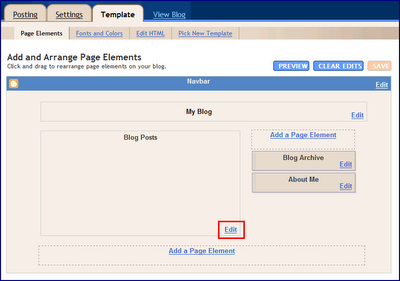
1) Log into your blogger.com account and go into the "Template" of your blog.
2) Click on "Edit" in the "Blog Posts" section of your page.
 3. Click on the "Show Ads between posts" button on the "Configure blog posts" menu (see image below)
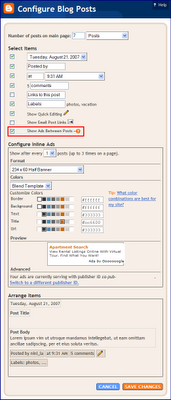 4. You'll be able to select the Adsense format to appear in between ads--feel free to play around with the size and the font. Some of the thoughts that have worked best with others is to (1) Have your adsense font and format blend well with the rest your sites content (2) Consider using the larger rectangular banners.
___________________________________
Adsense Tip: Dress for Success
Adsense Tip: Go Above the Fold
Adsense Tip: Bigger is Better
Adsense Tip: Placement Matters
Adsense Tip: Keep Focused
1) Log into your blogger.com account and go into the "Template" of your blog.
2) Click on "Edit" in the "Blog Posts" section of your page.
 3. Click on the "Show Ads between posts" button on the "Configure blog posts" menu (see image below)
 4. You'll be able to select the Adsense format to appear in between ads--feel free to play around with the size and the font. Some of the thoughts that have worked best with others is to (1) Have your adsense font and format blend well with the rest your sites content (2) Consider using the larger rectangular banners.
___________________________________
Adsense Tip: Dress for Success
Adsense Tip: Go Above the Fold
Adsense Tip: Bigger is Better
Adsense Tip: Placement Matters
Adsense Tip: Keep Focused
Subscribe to:
Posts (Atom)


